
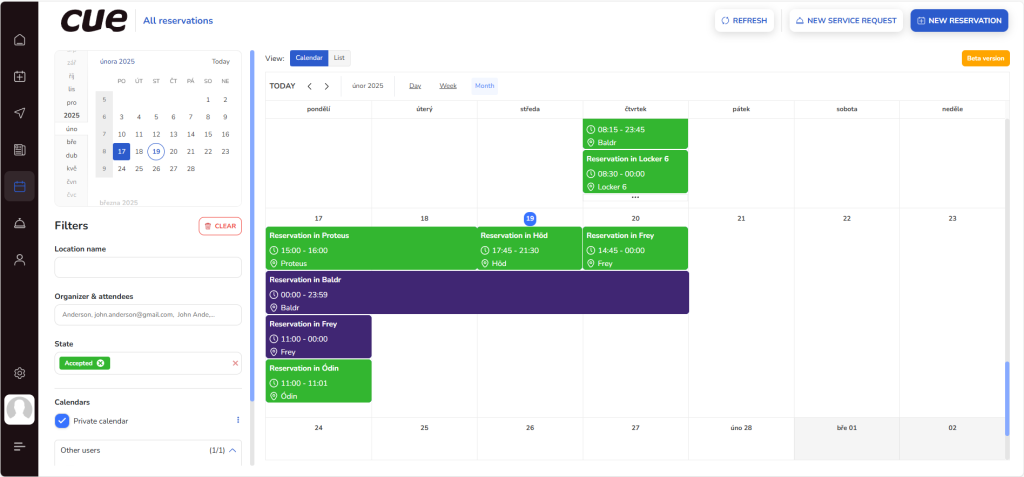
Native calendar platform for CUE Solution
CUE Calendar
- Full-featured calendar tool for resource reservations by users
- Alternative to external calendar servers such as Microsoft 365 or Google Workspace
- Direct integration with CUE Admin, CUE Assist, CUE Navigation, and reservation panels
- Suitable for meeting rooms, shared offices, parking spaces, and building operations with a large number of shared resources
Description
CUE Calendar is the native calendar platform within CUE Solution. It allows users, groups, shared resources, reservations, availability, and invitations to be managed directly in the CUE ecosystem without the need for an external calendar server.
In typical installations, the reservation system is often connected to Microsoft 365, Microsoft Exchange, or Google Workspace. CUE Calendar covers the same core need – planning and reservations – but is designed specifically for building operations, meeting rooms, workplaces, parking spaces, and other shared resources. As a result, the entire reservation process can be managed in one environment and adapted to scenarios that standard corporate calendars only address indirectly.
CUE Calendar is tightly integrated with CUE Admin, CUE Assist, CUE Navigation, and CUE reservation panels. Administrators can manage users, resources, groups, permissions, timetables, and configuration in CUE Admin. Users can then use CUE Assist to find suitable resources, create reservations, invite attendees, check availability, and navigate directly to the reserved location.
Benefits
Unified scheduling without external dependencies
CUE Calendar can replace external calendar systems for shared-resource reservation scenarios. Reservations, availability, users, and resources are managed directly in CUE Solution, reducing dependency on third-party configuration, tenant permissions, and external accounts.
Designed for resources, not only personal calendars
CUE Calendar is prepared for resources used in buildings: meeting rooms, workplaces, parking spaces, equipment, or other reservable items. Each resource can have capacity, time zone, working hours, timetable, and reservation rules configured.
One administration environment
Administrators do not need to switch between CUE Admin and an external Microsoft 365 or Google Workspace environment. Users, resources, groups, timetables, identity providers, e-mail configuration, logs, and import/export tools are available in CUE Admin.
Advanced permissions for shared environments
CUE Calendar includes its own group and user permission model. It can distinguish who is allowed to find a user, invite a user, see basic or extended user information, read the user’s schedule, see the user’s location, or read and edit public and private events.
Better fit for coworking and flexible offices
In environments where users, members, or visitors change frequently, it is not always practical to create a Microsoft 365 or Google Workspace account for everyone. CUE Calendar provides a simpler operational model for coworking, shared offices, campuses, and more public spaces.
Seamless integration with CUE front-end apps
CUE Calendar is natively supported in CUE Assist and in the CUE Solution calendar sync layer. Reservations, availability, event details, recurring reservations, reminders, groups, and attendees are used directly in the user-facing applications.
Connected reservation and navigation workflow
A reservation created for a CUE Calendar resource can be part of a broader workflow: the user finds a resource, checks its availability, creates a reservation, invites attendees, views the location detail, and can use navigation to reach the destination.
Typical Use Cases
Coworking centers
CUE Calendar is suitable for coworking centers that need to manage a large number of users, workplaces, meeting rooms, parking spaces, or lockers without depending on the customer’s corporate Microsoft 365 tenant.
A user can get access through an e-mail identity, reserve a resource in CUE Assist, find a colleague or group, view availability, and navigate to the reserved location.
Flexible offices
In flexible offices, CUE Calendar can be used to manage workplaces, meeting rooms, parking, and other shared spaces. Reservation rules can be customized for individual resource types.
Example: a workplace can be reservable only within its working timetable, a meeting room can have minimum and maximum reservation duration, and recurring reservations can have their own conflict limits.
Meeting rooms and reservation panels
CUE Calendar provides the calendar layer for rooms and reservation panels. Panels can display current and upcoming reservations, resource availability, and support standard event actions according to the system configuration.
Campuses and multi-building installations
For installations with multiple buildings or extensive floorplans, CUE Calendar makes sense as a central availability source for CUE Assist and CUE Navigation. The user reserves a resource and can then navigate to it.
CUE-only deployments
For customers who do not want to, or cannot, use an external calendar server, CUE Calendar can serve as a standalone calendar platform for CUE Solution.
Why Choose CUE Calendar
The table below highlights what CUE Calendar offers beyond Microsoft 365 or Google Workspace.
Aspects
CUE Calendar
Standard external calendar server
Focus
Shared resources, reservations, and building operations
Primarily personal and corporate calendars
Administration
Directly in CUE Admin
In an external tenant or admin center
Users
Can be managed as part of CUE Solution
Usually tied to a corporate directory / tenant
Resources
Capacity, timetables, working hours, and reservation rules in CUE Calendar
Depends on the capabilities and permissions of the external server
Groups and permissions
Fine-grained CUE permissions for public/private events, schedules, invitations, and location
Typically general calendar permissions
CUE Assist
Native mode without an external calendar provider
Integration through connection agents
CUE Navigation
Natural connection between reservation and navigation
Requires mapping external resources into CUE
Coworking
Suitable for members and guests without corporate tenant accounts
Often requires an account or external identity administration
Key Features
Users management
- CUE Calendar user management
- Multiple e-mail addresses per user
- Primary e-mail
- User search
- Batch user import/export
- Service account user support
- Connection to CUE Assist login scenarios
User groups and permissions
- User group management
- Group members and group owners
- Public/hidden groups and member visibility
- Permissions between group members
- Permissions of group owners toward members
- Rights to read and edit public and private events
- Rights to find a user, invite a user, read schedule, and view location
Resources management
- Reservable resource management
- Resource identifier (username)
- Display name
- Capacity
- IANA time zone
- Working hours and timetables
- Option to reject reservations outside working hours
- Batch resource import/export
- Synchronization of CUE Calendar resources into the main resources section in CUE Admin
Scheduling settings
Reservation rules can be configured for resources, for example:
- maximum number of days in advance for reservations
- minimum reservation duration
- maximum reservation duration
- recurring reservations enabled/disabled
- maximum recurring reservation range
- recurring reservation conflict rules
- maximum number of conflicting occurrences
- allowed percentage of conflicting occurrences
Calendar events
- Event creation
- Event editing
- Event deletion
- Finishing an active event
- Public and private events
- Busy/free status
- Attendees and resources as attendees
- Event location
- HTML event description
- Reminders
- Recurring events
- Editing a single occurrence or the whole series
Repetitive reservations
CUE Calendar supports recurring reservations for common patterns:
- daily
- weekly
- monthly by day
- monthly by relative day
- yearly by date
- yearly by relative day
Before a recurring reservation is created, resource availability can be checked within the defined validation window and conflicts can be handled according to the resource rules.
Availability and schedule
CUE Calendar provides schedule view for users and resources. This allows CUE Assist to display availability, filter suitable resources, and check conflicts during reservation.
Invitations
CUE Calendar can work with invitations for organizers and attendees. Administrators can configure SMTP sending, invitation templates, and target recipients.
Timetables and working hours
CUE Calendar supports timetables that can be assigned to resources. Timetables help define when a resource is normally available and make it possible to reject reservations outside the allowed time window.
Webhooks and calendar sync
CUE Calendar provides webhook subscriptions for changes in resource calendars. This allows CUE Solution to react quickly to event changes, invalidate cache, and update data used in applications.
Identity providers
CUE Calendar includes identity provider management. This makes it possible to prepare external identities for scenarios where users sign in through a supported authorization server.
Logs and diagnostics
CUE Calendar logs and test tools are available in CUE Admin, for example SMTP configuration test or inbound e-mail processing health check.
CUE Ecosystem Integration
CUE Admin
CUE Admin is the main administration environment for CUE Calendar. Administrators manage:
- server configuration
- users
- user groups
- resources
- identity providers
- logs
- timetables
- import/export
- connection agents for import, API operations, applications, and units
CUE Assist
CUE Assist uses CUE Calendar for:
- user sign-in in CUE Calendar mode
- colleague search
- group search
- availability display
- reservation creation
- reservation editing
- reservation cancellation
- finishing an active event
- recurring reservations
- reminders
- working with public/private events
CUE Navigation
CUE Navigation can use resource and reservation data as part of the user workflow. The user finds a resource, reserves it, and can then navigate to it.
Reservation panels
CUE Calendar can provide calendar data for reservation panels that display room availability and allow users to work with reservations according to configured permissions.
Calendar Sync
CUE Calendar is a supported provider in the CUE Solution Calendar Sync layer. In addition to Microsoft 365, Exchange, and Google Workspace, it has its own provider identification and support for loading and invalidating calendar events.